Synopsys Formality 培訓班 Synopsys Formality 培訓班 |
| 入學要求 |
|
學員學習本課程應具備下列基礎知識:
◆ 電路系統的基本概念。 |
|
班級規模及環境--熱線:4008699035 手機:15921673576/13918613812( 微信同號) |
|
堅持小班授課,為保證培訓效果,增加互動環節,每期人數限3到5人。 |
|
上課時間和地點 |
上課地點:【上海】:同濟大學(滬西)/新城金郡商務樓(11號線白銀路站) 【深圳分部】:電影大廈(地鐵一號線大劇院站)/深圳大學成教院 【北京分部】:北京中山/福鑫大樓 【南京分部】:金港大廈(和燕路) 【武漢分部】:佳源大廈(高新二路) 【成都分部】:領館區1號(中和大道) 【沈陽分部】:沈陽理工大學/六宅臻品 【鄭州分部】:鄭州大學/錦華大廈 【石家莊分部】:河北科技大學/瑞景大廈 【廣州分部】:廣糧大廈 【西安分部】:協同大廈
近開課時間(周末班/連續班/晚班):Synopsys Formality 培訓班:2025年12月15日..以質量求發展....合作共贏....實用實戰....用心服務..........--即將開課--........................(歡迎您垂詢,視教育質量為生命!) |
|
實驗設備 |
☆資深工程師授課
☆注重質量
☆邊講邊練
☆合格學員免費推薦工作
專注高端培訓17年,曙海提供的課程得到本行業的廣泛認可,學員的能力
得到大家的認同,受到用人單位的廣泛贊譽。
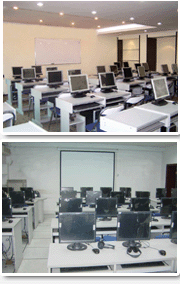
★實驗設備請點擊這兒查看★ |
|
新優惠 |
|
◆在讀學生憑學生證,可優惠500元。 |
|
質量保障 |
|
1、培訓過程中,如有部分內容理解不透或消化不好,可免費在以后培訓班中重聽;
2、課程完成后,授課老師留給學員手機和Email,保障培訓效果,免費提供半年的技術支持。
3、培訓合格學員可享受免費推薦就業機會。 |
Synopsys 軟件培訓班(上)
|
| |
第一階段 Synopsys Formality |
| 本課程可幫助IC工程師進一步全面系統地理解IC設計概念與方法。培訓將采用Synopsys公司相關領域的培訓教材,培訓方式以講課和實驗穿插進行。 |
Overview
This eight-day workshop covers, via lecture and lab, the basics of formal verification. On the first day, students will apply a formal verification flow for:
- Verifying a design
- Debugging a failed design
On the second day, students will apply an extended flow in order to:
- Optimize Formality for common hardware design transformations
- Increase debugging capability through techniques such as pattern analysis
- Maximize verification performance
Objectives
At the end of this workshop the student should be able to:
- Describe where Formality fits in the design flow
- Read a reference design and the libraries for that design into Formality
- Read a revised design and the libraries for that design into Formality
- Set up for verification interactively and with scripts
- Handle common design transformations for easiest verification
- Guide Formality in matching names between two designs
- Verify that two designs are equivalent
- Debug designs proven not to be equivalent
- Optimize reads, compare point matching and verification
Audience Profile
Design or Verification engineers who understand traditional functional verification methods, and who want to perform verification more quickly, without using vectors.
Prerequisites
Knowledge of digital logic.
Course Outline
第一部分
- Introduction
- Controlling Formality
- Setting up and running Formality
- Debugging designs proved not equivalent
第二部分
- Design transformations and their effect on equivalence checking
- Advanced debugging
- Maximizing performance
|
第二階段 Synopsys Prime Time 1 |
Overview
This workshop shows you how to maximize your productivity when using PrimeTime. You will validate and enhance run scripts, quickly identify and debug your design violations by generating and interpreting timing reports, remove pessimism with path-based analysis, and generate ECO fixing guidance to downstream tools.
Topics include:
- Preparing for STA on your design, including investigating and analyzing the clocks that dictate STA results
- Validating inherited PrimeTime run scripts
- Leveraging the latest PrimeTime best practices to create new run scripts
- Identifying opportunities to improve run time
- Performing static timing analysis
- Providing ECO fixing guidance to downstream tools
Objectives
At the end of this workshop the student should be able to:
- Interpret the essential details in a timing report for setup and hold, recovery and removal, and clock-gating setup and hold
- Generate timing reports for specific paths and with specific details
- Generate summary reports of the design violations organized by clock, slack, or by timing check
- Validate, confirm, debug, enhance, and execute a PrimeTime run script
- Create a PrimeTime run script based on seed scripts from the RMgen utility
- Identify opportunities to improve run time
- Create a saved session and subsequently restore the saved session
- Identify the clocks, where they are defined, and which ones interact on an unfamiliar design
- Reduce pessimism using path-based analysis
- Use both a broad automatic flow for fixing setup and hold violations and a manual flow for tackling individual problem paths.
Audience Profile
Design or verification engineers who perform STA using PrimeTime.
Prerequisites
To benefit the most from the material presented in this workshop, students should have:
- A basic understanding of digital IC design
- Familiarity with UNIX workstations running X-windows
- Familiarity with vi, emacs, or other UNIX text editors
Course Outline
第一部分
- Does your design meet timing?
- Objects, Attributes, Collections
- Constraints in a timing report
- Timing arcs in a timing report
- Control which paths are reported
第二部分
- Summary Reports
- Create a setup file and run script
- Getting to know your clocks
- Analysis types and back annotation
第三部分
- Additional checks and constraints
- Path-Based Analysis and ECO Flow
- Emerging Technologies and Conclusion
|
| |
第三階段 Synopsys Prime Time 2 |
PrimeTime: Debugging Constraints
Overview
This workshop addresses the most time-consuming part of static timing analysis: debugging constraints. The workshop provides a method to identify potential timing problems, identify the cause, and determine the effects of these problems. Armed with this information, students will now be able to confirm that constraints are correct or, if incorrect, will have sufficient information to correct the problem.
Incorrect STA constraints must be identified because they obscure real timing violations and can cause two problems: either the real violations are missed and not reported or violations are reported that are not real, making it difficult to find the real violations hidden among them.
Objectives
At the end of this workshop the student should be able to:
- Pinpoint the cause and determine the effects of check_timing and report_analysis_coverage warnings
- Execute seven PrimeTime commands and two custom procedures to trace from the warning to the cause and explore objects in that path
- Systematically debug scripts to eliminate obvious problems using PrimeTime
- Independently and fully utilize check_timing and report_analysis_coverage to flag remaining constraint problems
- Identify key pieces of a timing report for debugging final constraint problems
Audience Profile
Design or Verification engineers who perform STA using PrimeTime
Prerequisites
To benefit the most from the material presented in this workshop, students should have:
OR
Possess equivalent knowledge with PrimeTime including:
- Script writing using Tcl
- Reading and linking a design
- Writing block constraints
- Generating and interpreting timing reports using report_timing and report_constraint commands
Course Outline
Unit 1: Tools of the Trade
- Lab 1 A Guided Tour of the Tools of the Trade
- Lab 2 Choose the Correct Command and Apply It
Unit 2: Complete Qualification of PrimeTime Inputs
- Lab 3 Find and Debug Potential Constraint Problems
|
第四階段 TetraMAX 1 |
Overview
??????
In this two-day workshop, you will learn how use TetraMAX? the Synopsys ATPG Tool, to perform the following tasks:
- Generate test patterns for stuck-at faults given a scan gate-level design created by DFT Compiler or other tools
- Describe the test protocol and test pattern timing using STIL
- Debug DRC and stuck-at fault coverage problems using the Graphical Schematic Viewer
- Troubleshoot fault coverage problems
- Save and validate test patterns
- Troubleshoot simulation failures
- Diagnose failures on the ATE
This workshop includes an overview of the fundamentals of manufacturing test, including:
- What is manufacturing test?
- Why perform manufacturing test?
- What is a stuck-at fault?
- What is a scan chain?
?????? This workshop also includes an overview of the Adaptive Scan and Power-Aware APTG features in TetraMAX?
Objectives
At the end of this workshop the student should be able to:
- Incorporate TetraMAX?ATPG in a design and test methodology that produces desired fault coverage, ATPG vector count and ATPG run-time for a full-scan or almost full-scan design
- Create a STIL Test Protocol File for a design by using Quick STIL menus or commands, DFT Compiler, or from scratch
- Use the Graphical Schematic Viewer to analyze and debug warning messages from Design Rule Check or fault coverage problems after ATPG
- Describe when and how to use at least three options to increase test coverage and/or decrease the number of required test patterns
- Save test patterns in a proper format for simulation and transfer to an ATE
- Validate test patterns using Verilog Direct Pattern Validation or MAX Testbench
- Use TetraMAX diagnosis features to analyze failures on the ATE
Audience Profile
??????
ASIC, ASIC, SoC, or Test Engineers who perform ATPG at the Chip or SoC level
Prerequisites
??????
To benefit the most from the material presented in this workshop, students should have taken the DFT Compiler 1 workshop or possess equivalent knowledge with DFT Compiler and fundamentals of manufacturing test including:
- Understanding of the differences between manufacturing and design verification testing
- Stuck-at fault model
- Internal and boundary scan chains
- Scan shift and capture violations
- Major scan design-for-test rules concerning flip-flops, latches, and bi-directional/tri-state drivers
- Understanding of digital IC logic design
- Working knowledge of Verilog or VHDL language
- Familiarity with UNIX workstations running X-windows
- Familiarity with vi, emacs, or other UNIX text editors
Course Outline
第一部分
- Introduction to ATPG Test
- Building ATPG Models
- Running DRC
- Controlling ATPG
第二部分
- Minimizing ATPG Patterns
- Writing ATPG Patterns
- Pattern Validation
- Diagnosis
- Conclusion
|
第五階段 TetraMAX 2: DSMTest ATPG |
TetraMAX 2: DSMTest ATPG
Overview
This workshop discusses at-speed faults and how to use TetraMAX for at-speed test. Topics include description, recommendation, and scripts of transition, small-delay defect, and path-delay fault model ATPG. Also covered are the Onchip Clock Controller (OCC) flow, which leverages the PLL fast clocks, and using PrimeTime to generate the necessary data for at-speed test.
Hands-on labs follow each training module, allowing you to apply the skills learned in lecture. Labs include: using PrimeTime to generate the necessary files for at-speed ATPG; generating the patterns for different fault models in Tetramax; and, finally, using VCS for simulating the patterns generated.
Objectives
At the end of this workshop the student should be able to:
- Describe the need for At-Speed testing
- List the At-Speed fault models available
- Describe the two launch techniques for at-speed faults
- Successfully edit a stuck-at SPF file to suit at-speed fault model
- Define the timing exceptions
- Automate the process of script generation for TetraMAX, using PrimeTime. This script will take care of the false and multi-cycle paths
- Modify a given stuck-at fault model script to run for an at-speed fault model
- State the steps required to merge transition and stuck-at fault patterns to reduce the overall patterns
- Automatically create scripts that can be used in PrimeTime to perform test mode STA
- Describe the SDD flow
- Describe the flow needed to successfully use the PLL present in your design to give the at-speed clock during capture mode
- State the steps needed to perform path-delay ATPG
- Understand the fault classification in path-delay ATPG
Audience Profile
Engineers who use ATPG tools to generate patterns for different fault models.
Prerequisites
To benefit the most from the material presented in this workshop, you should: A. Have taken the TetraMAX 1 workshop. OR B. Possess knowledge in the following areas:
- Scan Architecture and ATPG
- Stuck-At fault model ATPG with TetraMAX
- SPF file
Course Outline
Module 1
- Introduction of At-Speed defects
- Source of Test Escapes and chip failure
- Requirements for At-Speed testing
- Popular fault models for At-Speed testing
Module 2
- Transition Fault model
- Path Delay Fault model
- At-Speed Fault Detection Method
- Techniques to Launch and Capture a Fault
Module 3
- STIL file
- Modifications to STIL file for At-Speed testing
- Generic Capture Procedures
Module 4
- Timing Exceptions
- Automated Way to Generate Timing Exceptions form PrimeTime
Module 5
- TetraMAX Scripts for Transition ATPG
- Design Guidelines
- Flow Considerations and Requirements
- Pattern Merging
- Automated way to generate the scripts for PrimeTime to perform testmode STA
Module 6
- What is a Small Delay Defect ATPG
- How to use PrimeTime to Generate the Slack Data
- ATPG Flow in TetraMAX
Module 7
- Requirement of PLL for At-speed faults
- The various clocks in PLL flow
- Use QuickSTIL to generate the SPF
Module 8
- TetraMAX scripts for Path Delay ATPG
- Fault Classification for Path Delay Faults
- Generating Paths for TetraMAX Using PrimeTime
- Reconvergence Paths
- Hazard Simulation
Module 9
- Conclusion
- Topics Covered
- Fault model and Features of TetraMAX
- Solvnet Resources
|
|
|












 首 頁 培訓新動態
 中文一区二区_九九精品在线播放_久久国产精品免费视频_国内精品在线观看视频












 shuhaipeixun
 總部李老師
總部李老師